



I still remember that morning when I watched my partner spend a good five minutes adjusting the seat, steering wheel, and mirrors every time she took the wheel after me. With our 25-centimeter height difference, it was systematic. That’s when I truly understood the benefit of Tesla driver profiles. Since we configured our respective profiles, these tedious adjustments are a thing of the past.
Whether for family use or couples, everyone has their own body type, driving habits, and preferences. Driver profiles literally transform the daily driving experience by allowing each person to instantly find their ideal driving environment.
In this comprehensive tutorial, I’ll show you how to create and customize your profiles, and also share my tips for making the most of this truly life-changing feature.
Why driver profiles are a game-changer for daily use
Personalized comfort that adapts instantly
The magic of Tesla driver profiles begins as soon as you get into the vehicle. In a few seconds, everything adjusts automatically: seat position, steering wheel height and depth, and the orientation of the exterior and interior mirrors.
Besoin d'accessoires pour ta Tesla ?
Looking for accessories for your Tesla?
But that’s not all. Your driving preferences are also restored: your favorite driving mode, energy regeneration level, and usual climate control temperature. No more tedious manual adjustments every time drivers switch!
Take the concrete example of a couple with a significant height difference. When I’m 1.85m tall and my partner is 1.60m, the seat settings are radically different. Without profiles, it was always five minutes of adjustments. Today, everything happens automatically.
Beyond comfort: safety and unique preferences
The benefits extend far beyond simple physical comfort. Each driver also finds their personalized safety settings: Autopilot follow distance, lane departure warning level, and alert sensitivity.
Your interface preferences are also saved: favorite radio stations, frequent navigation destinations, dashboard display layout, and choice of displayed widgets.
I particularly appreciate that the energy consumption history is individualized. This allows us to compare our respective driving styles and even challenge each other to eco-driving in family use! This feature is also very useful if you occasionally lend your Tesla to a friend or family member.
Tutorial: Create your first driver profile in 3 minutes
Step 1 – Accessing profile settings
Creating a new profile is surprisingly simple. Start by touching the profile icon located in the top left corner of the central touchscreen. A drop-down menu will appear with a list of existing profiles.
Select “Add New Driver” at the bottom of the menu. The interface will then prompt you to name this new profile. I recommend simply using a first name or an easy-to-identify nickname.
Here’s a tip I wish I’d known from the start: you can link the profile to your phone or a specific key card. This allows for automatic detection of the driver, but I’ll go into more detail about this in the advanced tips section.
Step 2 – Configure physical settings
Once the profile is created, it’s time for customization! Get comfortable in the driver’s seat and start by adjusting the driver’s seat position. Play with all parameters: seat height, depth, backrest recline, and lumbar support if your model has it.
Next, adjust the steering wheel. Adjust its height and depth until you find the ideal position that gives you a good view of the dashboard while keeping your arms slightly bent.
Finally, position the exterior mirrors and the rearview mirror. Take your time with these adjustments, as they are crucial for your safety and driving comfort.
The good news? All these settings are automatically saved to your profile in real-time. You don’t need to press any “save” button. To optimize all essential Tesla settings, these physical adjustments are the indispensable foundation.
Customize driving and interface preferences
Beyond physical settings, your profile stores a multitude of preferences that define your driving experience. Your preferred driving mode, for example: Chill for smooth and economical driving, Standard for balance, or Sport for maximum performance depending on your model.
Besoin d'accessoires pour ta Tesla ?
Looking for accessories for your Tesla?
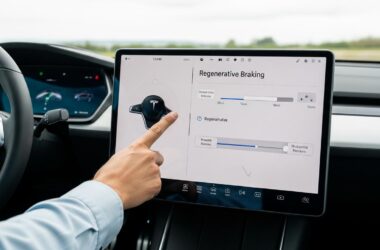
The energy regeneration level is also among the saved parameters. Personally, I love strong regeneration, which allows for almost one-pedal driving, but my partner prefers softer regeneration, closer to a traditional internal combustion car.
Your default climate control settings are saved: preferred temperature, airflow direction, and seat heater activation. Audio preferences (equalizer, balance, favorite stations) and navigation preferences (avoid tolls, satellite or map display) are also part of the profile.
The dashboard display can be customized according to your priorities: some prefer to constantly see energy consumption, others the speed limiter or remaining driving range. Driving assistance options such as Autopilot alerts, follow distance, or warning sensitivity are also individualized.
To further customize your driving settings, feel free to experiment with these different options until you find the perfect combination for you.
Advanced tips for getting the most out of profiles
Automatic detection: the ultimate in simplicity
Here’s the feature I consider absolutely essential: linking your profile to your phone. Once this link is established via Bluetooth (with the Phone Key feature), your Tesla automatically detects who is approaching the vehicle and loads the corresponding profile even before you get in.
You can also link your profile to a specific key card if you prefer this method. Configuration is simple: go to your Profile, then Driver Settings, and select “Link Device.” Follow the on-screen instructions, and you’re done!
Since I activated this automatic detection, I have literally never had to manually select my profile again. The vehicle recognizes me, unlocks the doors, and when I get in, everything is already perfectly adjusted. It’s truly magical.
Managing multiple profiles for family use
A Tesla allows you to create up to 10 different profiles, which is more than enough even for a large family. I recommend creating a “Guest” profile with neutral settings for occasional drivers: a visiting friend, a mechanic during a service, or a family member who rarely drives.
You can modify or delete an existing profile at any time via the profiles menu. A feature I use regularly is the “valet” profile, which allows you to impose limitations: reduced maximum speed, locked frunk, restricted access to certain settings. Very useful if you entrust your Tesla to a valet.
The small details that make all the difference
Allow me to share a few lesser-known but incredibly practical features. The “Easy Entry” profile is a real plus: it automatically moves the seat and steering wheel back as far as possible when you turn off the ignition, making it easier to exit the vehicle. When you return, the profile restores instantly.
If you’re not satisfied with your settings, you can reset a profile to factory settings and start from scratch. A reassuring option if you feel like you’ve messed everything up while experimenting.
Here’s a detail few owners know: profiles sync via your Tesla account. If you change vehicles or rent a Tesla during a trip, your profiles can be transferred. Profile sharing between multiple family Teslas is also possible if you own two vehicles.
Finally, good news if you accidentally deleted a profile: there’s a restore function within 30 days of deletion. To learn everything about Tesla seat customization and comfort, these settings are the very heart of the driver profile experience.
After several months of daily use, I can confirm that Tesla driver profiles are one of those features that you underestimate at first but then can’t live without. For family use, it has become absolutely essential. My partner and I no longer waste a single second on adjustments, and everyone instantly finds their ideal driving environment, including your vehicle’s settings adapted to each user.
My advice: take three minutes today to set up your profiles. You’ll thank me on your next trip! And you, how many profiles have you created in your Tesla? Feel free to share your configuration tips in the comments; I love discovering how other owners optimize their experience.
Profitez d'avantages exclusifs en achetant votre Tesla
Vous envisagez d'acquérir une Tesla ? En utilisant mon code de parrainage lors de votre achat, vous pouvez bénéficier d'avantages exceptionnels !
Des kilomètres gratuits de recharge ou d'autres récompenses exclusives, mon code de parrainage est votre passeport pour des avantages supplémentaires : https://ts.la/antoine49352 🤩
Pas de pression, juste une opportunité à saisir pour enrichir votre expérience Tesla.
Découvrez ici le système du parrainage et comment utiliser le code.
Get exclusive perks when buying your Tesla
Thinking about getting a Tesla? If you use my referral code when you purchase, you may be eligible for extra perks.
Free Supercharging miles or other exclusive rewards - my referral code can unlock additional benefits: https://ts.la/antoine49352 🤩
No pressure - just a simple option if you want to enhance your Tesla experience.
Learn how the Tesla referral program works and how to use the code.