

The speed limit sign detection on Tesla relies on a combination of onboard cameras and real-time mapping data: when both sources agree, the result is reliable. But the system can make mistakes – temporary signs, outdated maps, bad weather – and if Autopilot is active, it follows the detection to the letter. The golden rule: always keep your eyes on the road, no matter how much you trust your screen.
It’s something that happened to me on a small country road: the Tesla was calmly displaying 110 km/h when I was right in the middle of a 50 zone, just after a village. For a split second, I looked at the screen, then the sign, then the screen again – wondering if my car was joking. It wasn’t joking, it had simply got it wrong.
Every Tesla driver has experienced this kind of moment at least once. Tesla Autopilot sign detection is impressive most of the time, but not infallible. So let me explain it to you the way we’d talk about it in the car: how the system really works, why it sometimes gets things wrong, and what you can do about it.
Your Tesla’s eyes and brain: how it reads signs
Sign recognition relies on two combined sources: on one side, onboard cameras, and on the other, mapping data (GPS + HD maps). These two streams of information work together continuously – this is what is known as data fusion or sensor fusion.
Besoin d'accessoires pour ta Tesla ?
Looking for accessories for your Tesla?
The engine behind all of this is the Tesla neural network (Neural Network). It analyzes in real time the images captured by the cameras to identify the shape, color, and numbers on signs. This is not simple geometric shape recognition: the system learns, refines itself, and distinguishes a speed limit sign from an end-of-zone sign or a red commercial sign.
Map data serves as a safety net: if the camera misses a sign, the map can compensate. And vice versa. It is this redundancy that makes the system reliable overall – but also what creates strange situations when the two sources disagree.
What cameras really see
On recent models equipped with Hardware 4 (HW4) – such as the Model 3 Highland or the latest Model S/X – Tesla features 8 high-resolution cameras, compared to 8 cameras on the HW3 of previous models, but with significantly improved image quality and color calibration. The main front-facing camera, positioned at the level of the interior rearview mirror, is the one responsible for computer vision for sign detection.
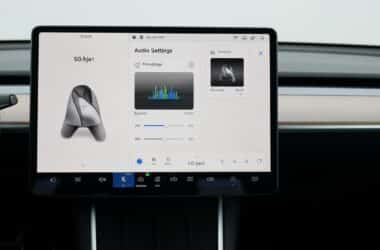
The result is displayed in the top left of the touchscreen, in the form of a red circle with the detected speed limit figure. Simple, discreet, but decisive when Autopilot is active. Under normal visibility conditions, detection occurs at a sufficient distance to anticipate — but this range drops as soon as conditions deteriorate.
The camera + mapping fusion
Concretely: when the camera reads “50” and the map also says “50”, the system displays the information with high confidence. When the two sources diverge, Tesla generally prioritizes real-time map data for the displayed value, but the camera can take over if it detects a recent change not yet integrated into the maps.
This behavior evolves with OTA updates (Over The Air) – the software running on your Tesla today is not the same as it was six months ago. It is through these updates that Tesla refines the hierarchy between sources. To learn more about safety questions surrounding Tesla driver assistance systems, it is a subject that deserves to be examined with clear eyes, free from preconceived notions in either direction.
When the Tesla crashes: real-life cases that happen to everyone
Let’s be honest, it happens, and it’s often frustrating – or downright funny depending on the context. False positive detections and incorrectly displayed limitations have their own major families. Here are the four most common ones.
Temporary construction signs. Temporary speed limits related to roadworks or events do not appear on HD maps. Tesla can therefore only detect them through its cameras, with less reliability. In low-light conditions or when a sign is partially obscured by a construction vehicle, it may miss the detection or display the old speed limit.
Private area or exit signs. A “30 km/h” sign at the entrance to a roadside car park can very easily be interpreted as a general speed limit. End-of-zone signs are also sometimes ignored, leaving the previous speed limit displayed for a little too long.
Outdated maps. In new residential areas or following a speed limit change decided by the municipality, maps may display the old speed for a certain period of time. The delay for updating cartographic data at Tesla is not officially communicated, but community feedback suggests it can take anywhere from several weeks to several months depending on the area.
Weather conditions and lighting. Glaring sun at the end of the day, pitch darkness, a snow-covered or dirty sign: the camera struggles to read it. The map then takes over – but if it is also incorrect for that stretch of road, you end up with an incorrectly displayed speed limit with no safety net. For a comprehensive assessment of driver assistance features in these situations, I refer you to the complete evaluation of the Model 3 2024 and its driver assistance features.
Automatic speed adjustment: when detection truly drives your Autopilot
This is where it gets really important. When you activate Autopilot or TACC (Traffic-Aware Cruise Control), your Tesla can automatically adjust its target speed based on the detected sign. It’s no longer just information displayed on the screen – it’s a concrete action on the car.
In the settings, you’ll find this option under Controls > Autopilot > Set Speed: you can choose between “Speed Limit” (the Tesla matches its speed to the detected sign) or “Current Speed” (it maintains your speed at the moment of activation). If you choose “Speed Limit”, you can also set a Speed Limit Warning – a fixed or percentage offset above the detected speed limit.
Besoin d'accessoires pour ta Tesla ?
Looking for accessories for your Tesla?
The direct consequence: if the detection makes a mistake, the Tesla adaptive regulator makes a mistake too. If the Tesla thinks it’s in a 110 zone when it’s actually in a 50 zone, and Autopilot is set to the detected limit… you can see the problem. That’s exactly why staying attentive remains non-negotiable, even with the latest Tesla updates that have refined these behaviors.
The automatic speed adjustment is available on all Tesla vehicles equipped with standard Autopilot. Vehicles with FSD (Full Self-Driving) additionally benefit from more refined management, particularly since recent software versions that allow the system to adapt its speed by taking into account the overall road context, and not just the sign.
How Tesla improves (and how you can help)
Tesla evolves its system through OTA updates. The 2023.2.0.5 update, for example, improved traffic sign recognition via the vehicle’s cameras. More recently, the 2024.26.7 update refined the visibility controls for side cameras, with a direct impact on detection in degraded conditions.
Behind all this lies the principle of the Tesla learning fleet: each car sends back anonymized data that trains the neural network. The more Teslas there are on the road, the more refined the system becomes. Today’s detection is much better than it was two years ago – and the detection two years from now will be even better still.
On your side, you can also actively contribute:
- Report Tesla mapping errors directly from the vehicle menu or via the Tesla app – it’s quick and helps fix problematic areas.
- Never blindly trust the display: the responsibility for complying with the Highway Code remains entirely with the driver, regardless of what the screen shows.
- Keep your software up to date to benefit from the latest improvements – OTA updates download automatically, but installation happens when you allow it.
The system is imperfect today, but constantly improving. In daily use, it is already reliable – and the rare errors simply serve as a reminder that technology remains an assistant, not a replacement. As the Highway Code makes clear, it is the driver who remains responsible for complying with speed limits, regardless of the technological assistance embedded in their vehicle.
Profitez d'avantages exclusifs en achetant votre Tesla
Vous envisagez d'acquérir une Tesla ? En utilisant mon code de parrainage lors de votre achat, vous pouvez bénéficier d'avantages exceptionnels !
Des kilomètres gratuits de recharge ou d'autres récompenses exclusives, mon code de parrainage est votre passeport pour des avantages supplémentaires : https://ts.la/antoine49352 🤩
Pas de pression, juste une opportunité à saisir pour enrichir votre expérience Tesla.
Découvrez ici le système du parrainage et comment utiliser le code.
Get exclusive perks when buying your Tesla
Thinking about getting a Tesla? If you use my referral code when you purchase, you may be eligible for extra perks.
Free Supercharging miles or other exclusive rewards - my referral code can unlock additional benefits: https://ts.la/antoine49352 🤩
No pressure - just a simple option if you want to enhance your Tesla experience.
Learn how the Tesla referral program works and how to use the code.