


winter is coming, and with it, the temptation to crank up the heating in your Tesla. But have you ever noticed how your driving range melts away like snow in the sun as soon as you activate the climate control? The good news is that Tesla heated seats are a much more economical alternative. After several winters driving my Tesla, I’m going to show you how to stay warm without sacrificing your driving range. Here’s what we’ll cover: practical tips, optimal settings, and possible automations to fully enjoy winter without battery anxiety.
Why prioritize heated seats over traditional heating?
Let’s talk numbers to understand the stakes. When you activate your Tesla’s traditional heating, the heat pump or electric resistance consumes between 5 and 7 kW to heat the entire cabine intérieure. That’s huge! In comparison, heated seats only consume between 1 and 3 kW depending on the chosen level.
This difference in energy consumption directly impacts your driving range. Concretely, you can gain between 10 and 15% more driving range by prioritizing heated seats rather than full cabine intérieure heating. On a 300 km trip, that’s an extra 30 to 45 km!
The principle is simple: localized heating is much more energy-efficient. Instead of heating cubic meters of air, you directly heat your body where you are sitting. The sensation of warmth is immediate, and comfort is quickly achieved.
Besoin d'accessoires pour ta Tesla ?
Looking for accessories for your Tesla?
Since I started applying this method on my daily commutes, I’ve noticed a real difference in my winter range. My driving range no longer drops by 30-40% as before, but rather by 15-20%. It’s a game changer!
Activating and adjusting your heated seats: the complete guide
Activation from the touchscreen
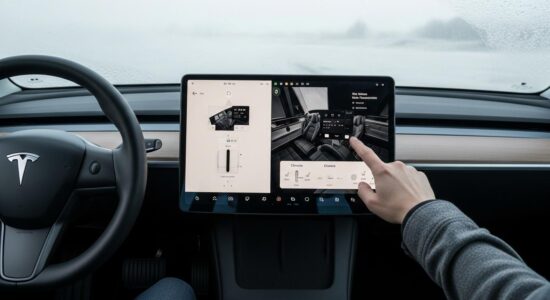
Activating the heated seats from the cabine intérieure is child’s play. Here’s the step-by-step procedure:
- Touch the climate control icon at the bottom of the screen
- In the menu that opens, you will see icons for the front and rear Seats
- Touch the icon of the seat you want to heat
- Select the desired heating level (1, 2, or 3 bars)
Tesla offers 3 different heating levels, represented by red bars. The more bars you have, the more intense the heat. You can adjust the driver’s seat and passenger Seats independently, which is very practical.
Time-saving tip: from the home screen, you can swipe up the bottom panel to quickly access climate controls without going through the full menu.
Using the mobile Tesla app before getting in
The real magic happens when you use the Tesla app on your smartphone. You can prepare the cabine intérieure even before getting into the car, from your couch or office.
Open the Tesla app, touch the climate control icon, and activate preheating. If you use the “Defrost” option, the heated seats automatically activate in addition to window heating. It’s perfect for frosty mornings.
Even better: schedule your departure time in the Settings. Your Tesla will be warm and ready at the exact time you leave for work. You can even combine this with preconditioning your battery to optimize overall performance.
My favorite tip: if your Tesla is plugged in during preconditioning, the energy comes directly from the grid and not from your battery. Result: you leave with 100% charge AND a warm cabine intérieure. Zero impact on driving range!
Finding the ideal heating level according to the temperature
Not all heating levels are equal, and more importantly, they are not suitable for the same situations. Here’s my guide based on the outside temperature:
Level 1 (one bar): Perfect for cool mornings between 5 and 10°C. Consumption is minimal, about 50W per seat. It’s enough to provide a little comfort without impacting the driving range.
Level 2 (two bars): This is my winter sweet spot for temperatures between 0 and 5°C. The best compromise between comfort and energy consumption. The heat is noticeable without being excessive, and consumption remains reasonable at around 100W per seat.
Level 3 (three bars): To be reserved for very cold weather below -5°C. Maximum power reaches about 150W per seat. It heats strongly and quickly, but consumption also increases.
My strategy: I always start with level 3 for the first 5 minutes to get quick heat, then I go down to level 2, or even 1 once I’m warm enough. The seat retains heat, and you no longer need that maximum power.
Besoin d'accessoires pour ta Tesla ?
Looking for accessories for your Tesla?
Golden rule: never leave level 3 activated for the entire trip. It’s unnecessary and energy-intensive.
Automate comfort: create customization Settings
Save your preferences by driver profile
Tesla allows you to associate your favorite climate control Settings with your driver profile. Concretely, your car remembers your heated seat preferences.
Configure your ideal Settings once (seat level, general temperature, air distribution), and they will activate automatically as soon as you get in the car. If multiple people drive the vehicle, each can have their profile with their own preferences.
It’s a real time-saver every day. No need to redo the same Settings every morning!
Schedule departure time for winter
The “Scheduled Departure” feature is probably one of Tesla’s most underestimated. Go to Settings > Scheduling, and configure the time you usually leave.
Your Tesla will preheat the cabine intérieure, activate the heated seats, and even optimize battery charging so that it is at the ideal temperature at departure time. All while primarily drawing electricity from the grid if you are plugged in.
The impact on the battery is considerable: leaving with an already warm car avoids that initial, very energy-intensive phase where you heat a freezing cabine intérieure while driving. The savings can reach several kWh on a trip.
If you want to go further in customization, I advise you to optimize all your Tesla’s Settings to get the most out of your vehicle.
My tips for maximizing energy efficiency
After several winters of experimentation, here are my best tips for staying warm while preserving your driving range:
Combine with the heated steering wheel: It’s the perfect duo! The heated steering wheel consumes very little (about 40W) and heats your hands directly. Heated seats + heated steering wheel = you can lower the general temperature by 2-3°C without losing comfort.
Adjust the general temperature: Instead of setting 22°C with classic heating, try 19°C with the seats at level 2. You’ll have the same feeling of comfort with 30% less energy consumption.
Wear appropriate clothing: It seems obvious, but a good sweater means you don’t have to rely solely on the car. You don’t have to drive in a t-shirt in the middle of winter!
Use “Keep” mode intelligently: During short stops (shopping, coffee break), “Keep” mode maintains the temperature without restarting everything. But deactivate the heated seats during these breaks; there’s no need to heat an empty seat.
Deactivate the rear Seats: If you’re driving alone, remember to deactivate the rear Seats if they were left on. It sounds silly, but it took me weeks to realize I was heating empty seats!
Monitor your energy consumption: Check the energy consumption screen to verify the real impact of your Settings. You’ll see the difference between a trip with full heating and a trip with heated seats only.
To explore all the comfort options of Tesla Seats, also discover the ventilation Settings that will be useful in summer.
Pro tip that changes everything: preheating your Tesla while it’s plugged into the grid has zero impact on driving range. It’s free in battery energy! As industry experts confirm, thermal management of electric vehicles is crucial for optimizing their overall energy efficiency.
Heated seats are your best allies for facing winter in a Tesla. With the right practices, you can preserve up to 15% of your driving range while staying perfectly warm. Don’t hesitate to test these Settings and adjust them according to your personal feelings. Every Tesla and every driver is different; the important thing is to find your ideal balance. And most importantly, enjoy winter in your Tesla without driving range anxiety – it’s entirely possible with these simple tips!
Profitez d'avantages exclusifs en achetant votre Tesla
Vous envisagez d'acquérir une Tesla ? En utilisant mon code de parrainage lors de votre achat, vous pouvez bénéficier d'avantages exceptionnels !
Des kilomètres gratuits de recharge ou d'autres récompenses exclusives, mon code de parrainage est votre passeport pour des avantages supplémentaires : https://ts.la/antoine49352 🤩
Pas de pression, juste une opportunité à saisir pour enrichir votre expérience Tesla.
Découvrez ici le système du parrainage et comment utiliser le code.
Get exclusive perks when buying your Tesla
Thinking about getting a Tesla? If you use my referral code when you purchase, you may be eligible for extra perks.
Free Supercharging miles or other exclusive rewards - my referral code can unlock additional benefits: https://ts.la/antoine49352 🤩
No pressure - just a simple option if you want to enhance your Tesla experience.
Learn how the Tesla referral program works and how to use the code.