

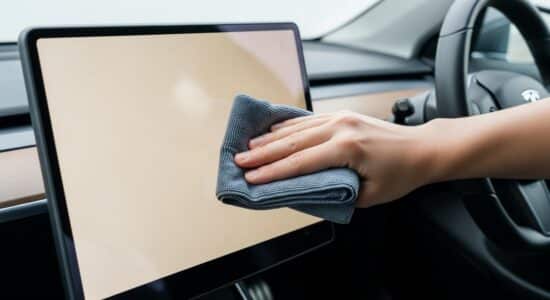
To clean your Tesla touchscreen safely, use only a microfiber cloth slightly dampened with distilled water. Absolutely avoid harsh products (alcohol, glass cleaners), paper towels, and excessive rubbing, which causes micro scratches. A light weekly clean is enough to keep your control center spotless without damaging the anti-glare coating.
My Tesla’s touchscreen is a bit like my giant smartphone: I use it constantly, for everything. Controlling the climate, adjusting mirrors, managing navigation, changing driving settings… It’s literally the control center for the entire vehicle.
But here’s the problem: after just a few days of use, this magnificent screen gets covered in unsightly fingerprints. At first, I wasn’t sure how to clean it. I was afraid of scratching the screen or damaging that anti-reflective coating that makes it so pleasant to use.
I learned the hard way that improper cleaning can cause irreversible damage: permanent scratches, persistent marks, dissolution of the oleophobic coating. And believe me, replacing that screen costs a small fortune.
Besoin d'accessoires pour ta Tesla ?
Looking for accessories for your Tesla?
After several years of use and a few missteps, I’ve developed a simple and effective routine. Here’s everything I’ve learned to keep my screen looking new, without taking any risks.
Mistakes to absolutely avoid to prevent damaging your screen
Forbidden products that can ruin your screen
The first thing I understood is that not all cleaning products are created equal. Some are downright destructive to the Tesla interior technologies.
Harsh cleaning products are your worst enemies:
- Pure or isopropyl alcohol
- Ammonia and classic window cleaners (Windex, etc.)
- Clorox-type disinfectant wipes
- Any product containing acetone or solvents
- Multi-purpose household sprays
Why are they so dangerous? Simply because they gradually dissolve the screen’s oleophobic and anti-reflective coating. A friend used standard window cleaner on his screen: the result was dull areas appearing after a few cleanings, impossible to recover.
Textiles and actions that create micro scratches
Beyond products, the choice of textile is crucial. I made the mistake at first of using whatever I had on hand, and I quickly regretted it.
Absolutely banish:
- Paper towels and absorbent paper: far too rough, they create micro scratches that are invisible at first but accumulate
- Old rags or dishcloths: they retain dust particles that act like sandpaper
- Dry cloths without any prior dampening
Regarding actions, avoid excessive pressure and aggressive circular motions. The most common mistake? Rubbing dry, thinking you’re doing good. That’s the best way to embed dust and create scratches.
My approved method for risk-free cleaning
The products I personally use
After testing different approaches, I settled on a minimalist and effective solution. Here’s my equipment:
A soft, quality microfiber cloth: I use those intended for glasses or computer screens, with a density of at least 300 g/m². They only cost a few euros and last for months.
Distilled or demineralized water: why not tap water? Because it contains minerals that leave white streaks when drying. Distilled water evaporates without residue.
Alternatively, I sometimes use an ultra-light solution of distilled water with 1 to 2 drops of neutral soap (like liquid Marseille soap). But honestly, water alone is enough 95% of the time.
I always keep a clean cloth in the central storage compartment. Total investment: between €5 and €10 for several months of use. It’s ridiculously economical compared to the cost of a damaged screen.
The step-by-step protocol I follow
Here is my precise maintenance routine, the one that has allowed me to keep a pristine screen:
Besoin d'accessoires pour ta Tesla ?
Looking for accessories for your Tesla?
Step 1: If possible, I activate the screen cleaning mode. On some models, you can simply say “Activate cleaning mode” via voice commands. This temporarily disables the touchscreen.
Step 2: I lightly dampen my microfiber cloth with distilled water. Caution: I NEVER spray directly onto the screen. Liquid could seep into the edges.
Step 3: I clean with gentle strokes, from top to bottom, without excessive pressure. No aggressive circular motions.
Step 4: I immediately dry with the clean, dry part of the cloth, always with gentle vertical movements.
Step 5: I check the result from different light angles to detect any persistent marks.
My personal tip: I systematically take advantage of Supercharger charging sessions to clean the screen. No rush, I can take my time while the battery fills up.
How often should the screen really be cleaned?
This is a question I pondered for a long time. Too often risks premature wear of the screen, not enough and marks accumulate.
My personal routine: a light weekly cleaning with just the damp microfiber cloth, and a more thorough cleaning once a month if necessary.
Of course, I adapt based on usage. After a long road trip or if several passengers have used the screen, I clean more frequently. The signs that tell me it’s time to act: visible marks in direct sunlight or difficulty reading certain information.
Prevention remains the best ally: I wash my hands before long journeys, I avoid touching the screen with greasy or dirty fingers. Simple but effective.
Like a smartphone, except the surface is much larger: same maintenance principle, but with broader movements. Avoid obsessive daily cleaning; it’s really not necessary.
My expert tips for keeping the screen pristine daily
Beyond pure cleaning, I’ve developed some habits that drastically reduce the frequency of necessary maintenance.
Habit #1: Always keep a clean microfiber cloth in the glove compartment. That way, as soon as I spot an annoying mark, I can intervene immediately without waiting.
I learned to make the most of voice commands and shortcuts when my hands aren’t perfectly clean. “Increase the temperature,” “Start navigation to home”… The less I touch the screen, the less it gets dirty.
Preventive protection: I avoid eating in the car near the screen. Food or drink splashes are the sworn enemy of touch surfaces.
My mobile maintenance kit that I always carry:
- 2 microfiber cloths (one for cleaning, one spare)
- Small 100ml bottle of distilled water
- That’s it. Really.
Regarding screen protectors: I’ve tested them, and my opinion is clear. Some love them, but I find they slightly alter touch responsiveness and display clarity. I prefer to do without and clean properly. But upon delivery of your Tesla, it’s a decision to make quickly if you opt for this protection.
If you have children passengers, establish clear rules: only touch the screen with clean hands, and ideally, you manage the interactions.
Beware of temperature: in the middle of summer, I never wipe a burning hot screen. I first let the car cool down for a few minutes with the air conditioning. A thermal shock could theoretically weaken the surface.
Last often overlooked point: monitoring the edges. Dust accumulates in the joints around the screen. I gently run a dry cotton swab from time to time to prevent these particles from ending up on the screen during the next cleaning.
Quick summary of my winning method: microfiber cloth + distilled water, gentle movements, reasonable frequency. This combination has allowed me to keep a screen without a single scratch after several years of intensive use.
The touchscreen is truly the soul of your Tesla; it deserves this attention. To deepen your knowledge of optimal maintenance, consult manufacturer recommendations which confirm these good practices.
My personal assessment: zero scratches, zero permanent marks, a screen that looks new. And all this with a ridiculously simple ritual that takes me a maximum of 2 minutes per week. A clean screen literally transforms the driving experience: everything is more readable, more pleasant, more fluid.
And you, what’s your cleaning routine? Have you developed any particular tips? Feel free to share your experiences in the comments; I love discovering new techniques proven by the Tesla community!
Profitez d'avantages exclusifs en achetant votre Tesla
Vous envisagez d'acquérir une Tesla ? En utilisant mon code de parrainage lors de votre achat, vous pouvez bénéficier d'avantages exceptionnels !
Des kilomètres gratuits de recharge ou d'autres récompenses exclusives, mon code de parrainage est votre passeport pour des avantages supplémentaires : https://ts.la/antoine49352 🤩
Pas de pression, juste une opportunité à saisir pour enrichir votre expérience Tesla.
Découvrez ici le système du parrainage et comment utiliser le code.
Get exclusive perks when buying your Tesla
Thinking about getting a Tesla? If you use my referral code when you purchase, you may be eligible for extra perks.
Free Supercharging miles or other exclusive rewards - my referral code can unlock additional benefits: https://ts.la/antoine49352 🤩
No pressure - just a simple option if you want to enhance your Tesla experience.
Learn how the Tesla referral program works and how to use the code.