

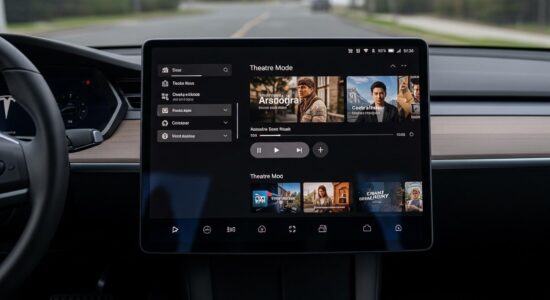
Your Tesla’s Theater Mode lets you watch Netflix and YouTube directly from the central screen, but only when the vehicle is parked and the parking brake is engaged. A stable internet connection is essential, and expect about 1 to 2% of driving range per hour of viewing depending on climate control usage.
Imagine yourself comfortably settled in your Tesla, waiting for a charging session to finish or while a friend runs errands. Rather than endlessly scrolling on your phone, why not take advantage of the magnificent central screen to watch your favorite series on Netflix or discover the latest YouTube videos?
Tesla’s Theater Mode literally transforms your vehicle into a private cinema. In this article, I’m going to share everything I’ve learned about this feature after months of daily use.
You’ll discover how to set up Netflix and YouTube on your Tesla, the conditions to follow, my tips for optimizing driving range, and especially how to fully enjoy these moments of relaxation without any unpleasant surprises.
Besoin d'accessoires pour ta Tesla ?
Looking for accessories for your Tesla?
Tesla’s Theater Mode: What Is It?
Theater Mode is a feature accessible directly from your Tesla’s central screen. Unlike the standard Entertainment mode which offers simple games, Theater Mode gives you access to genuine professional streaming applications.
This feature has evolved considerably through software updates. Today, depending on your region, you can access several major platforms:
- Netflix for your favorite series and movies
- YouTube for varied and free content
- Disney+ in certain regions
- Twitch for live streaming enthusiasts
- Hulu in the United States
The quality of the experience is truly impressive. With a 15 or 17-inch screen depending on your model, sharp resolution, and a quality integrated audio system, the viewing comfort rivals that of a high-end tablet.
The immersion is all the more successful because the screen is perfectly positioned and the Tesla’s interior offers a quiet and comfortable environment.
How to Access Netflix and YouTube on Your Tesla
Initial Setup and Connection
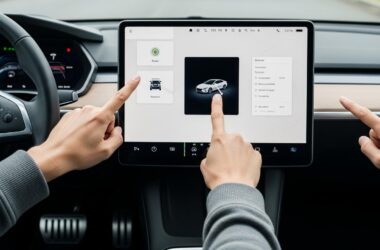
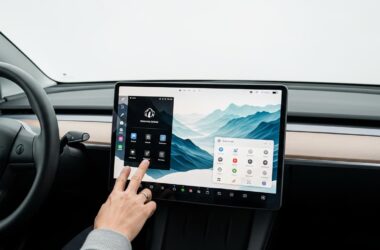
To access your streaming apps, start by tapping the Entertainment icon in the main menu on the screen. You’ll see all available entertainment options appear.
First essential step: make sure you have an active internet connection. You can use either Wi-Fi if you’re near a network, or your mobile hotspot from your smartphone. I personally recommend a generous data plan if you intend to use this feature regularly.
Next, select Netflix or YouTube from the menu. The first time, you’ll need to log in with your credentials. My tip: save your credentials so the connection is automatic during future uses. This avoids having to re-enter your password each time, especially with the screen’s virtual keyboard.
The user interface is intuitive and closely resembles the apps you already know on your television or tablet.
Usage Conditions to Follow
Attention, crucial point: you can only access Theater Mode when your vehicle is parked and the parking brake is engaged. This is an absolutely non-negotiable safety limitation.
As soon as you shift into Drive or release the brake, the app automatically pauses. Tesla has carefully designed this restriction to avoid any distraction while driving.
In some markets, there are even different restrictions between the driver and passengers, although in Europe, the main rule remains the vehicle being parked.
Don’t forget that streaming also consumes electricity. I’ll discuss this in more detail in the section on driving range impact, but always keep an eye on your battery level.
My Tips for Fully Enjoying Theater Mode
After months of using Theater Mode, I’ve developed some habits to optimize the experience without sacrificing driving range.
Besoin d'accessoires pour ta Tesla ?
Looking for accessories for your Tesla?
First tip: always monitor your battery. I’ve set myself a rule to never drop below 20% before starting a viewing session. Also limit the duration: one or two episodes maximum, not an entire season at once!
Little-known tip: temporarily disable Sentry Mode while you’re watching your content. This mode consumes energy in parallel to monitor the cameras, so you might as well save it if you’re in a safe environment.
Also think about adjusting the screen brightness according to the environment. In broad daylight in the sun, turn it up to see properly. In the evening, lower it to save energy and protect your eyes.
For sound, I love using my Bluetooth headphones. Not only is the audio quality better, but you won’t disturb anyone around you if you’re in a public parking lot.
Regarding climate control: that’s what consumes the most! My tip is to preheat or cool the interior before starting my movie, then maintain a moderate temperature during viewing.
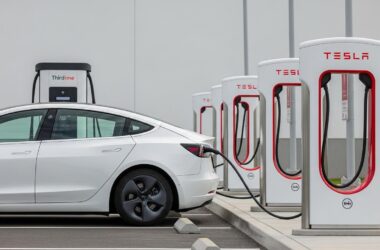
The ideal time to enjoy Theater Mode? During charging sessions at Superchargers. You can even enjoy the comfort of Tesla Lounges during charging at certain equipped locations, which makes the experience even more pleasant.
Last tip for comfort: adjust your seat properly to find the ideal position. On Model S and X, you can even retract the steering wheel to have a perfect view of the screen.
Technical Limitations to Know
Connection and Streaming Constraints
The quality of your experience depends heavily on your internet connection. With unstable 4G or 5G, you risk interruptions and a pixelated image. Wi-Fi remains the most reliable solution when possible.
Watch out for data consumption! HD streaming means several gigabytes per hour. If you’re using your mobile hotspot, check that you have a suitable plan, otherwise beware of the bill or reduced speed.
App availability also varies by region. Some platforms aren’t accessible everywhere, and for Netflix, you obviously need an active Premium account.
Impact on Vehicle Range
Let’s talk concrete numbers: expect about 1 to 2% of driving range per hour of viewing under normal conditions. But this estimate can vary considerably.
Variables that influence energy consumption include:
- Use of air conditioning or heating
- Outside temperature
- Screen brightness
- Sound volume
- Sentry Mode enabled or not
My golden rule: never completely drain the battery. Always keep a minimum of 20% before an extended session, especially if you’re not near a charger.
To better understand how to preserve your Tesla battery long-term, I recommend learning about general best practices for driving range management.
Beyond Netflix and YouTube: Other Screen Uses
Your Tesla’s screen isn’t limited to video streaming! It offers a whole universe of possibilities when you’re parked.
You can play built-in video games, some quite sophisticated. Karaoke mode transforms your car into a private karaoke room for fun moments with friends.
The web browser lets you browse your favorite sites, even if the experience isn’t always optimal without a mouse. You can also review recordings from your dashcam directly on the screen to check an incident.
More and more owners are even using their Tesla as a temporary workspace. With the right accessories, you can transform your Tesla into a mobile office and take advantage of the screen for various tasks.
The screen also lets you monitor the cameras in Sentry Mode, providing a complete view around the vehicle for your safety.
Theater Mode truly enriches the daily Tesla experience. The waiting times I used to dread have become moments I enjoy, comfortably settled with a good episode of a series. The important thing is to use it wisely by keeping an eye on your driving range and following official usage conditions.
I strongly encourage you to test this feature during your next charging sessions or breaks. Theater Mode represents a genuine added value of the electric vehicle, transforming charging constraints into opportunities for relaxation. And with Tesla’s regular updates, new features continue to arrive to enrich the experience.
Profitez d'avantages exclusifs en achetant votre Tesla
Vous envisagez d'acquérir une Tesla ? En utilisant mon code de parrainage lors de votre achat, vous pouvez bénéficier d'avantages exceptionnels !
Des kilomètres gratuits de recharge ou d'autres récompenses exclusives, mon code de parrainage est votre passeport pour des avantages supplémentaires : https://ts.la/antoine49352 🤩
Pas de pression, juste une opportunité à saisir pour enrichir votre expérience Tesla.
Découvrez ici le système du parrainage et comment utiliser le code.
Get exclusive perks when buying your Tesla
Thinking about getting a Tesla? If you use my referral code when you purchase, you may be eligible for extra perks.
Free Supercharging miles or other exclusive rewards - my referral code can unlock additional benefits: https://ts.la/antoine49352 🤩
No pressure - just a simple option if you want to enhance your Tesla experience.
Learn how the Tesla referral program works and how to use the code.